This action requires the **"create document type"** permission.
Creating a new document type requires no special procedures. When on document types' table view, click the **"Add new"** button to open the **"Add new form".** 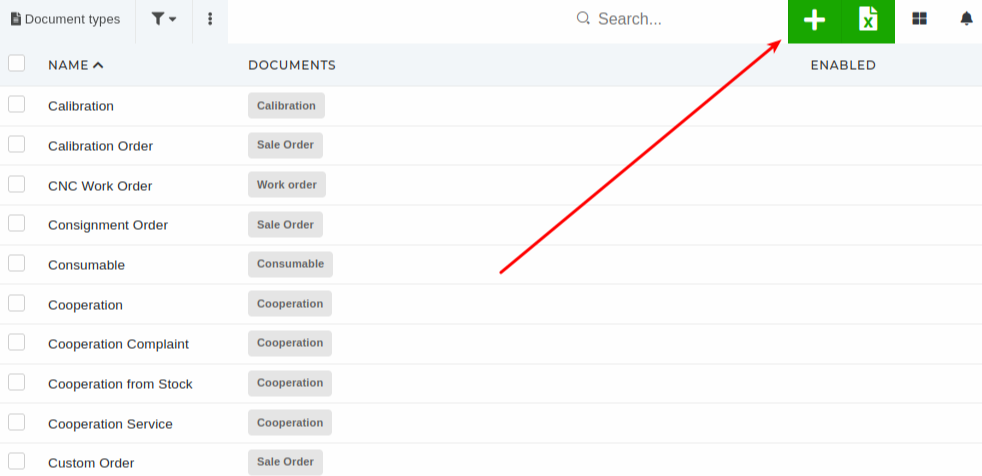 While filling out the form, select a document to which this document type belongs. After adding it's name, you have to write a formula, that will be used to generate document numbers for this document type.Adding a generator formula is important, because the formula defines the structure of a document type's document number.
In this example, the formula is **NEW-QUOTE-%5N-%YYYY**, which will generate document numbers, structured as NEW-QUOTE-00001-2024. **NEW-QUOTE-** is the prefix that is always the same for all instances of the document type. **%5N** is markdown, that defines this as 5 numbers, starting from 00001 up to 99999. **%YYYY** is markdown, that defines the date, formatted as year, eg. 2024.The **document number prefix** should **always** be **unique** to the document type in order to avoid confusion. These prefixes are also useful for quickly discerning a document's type.
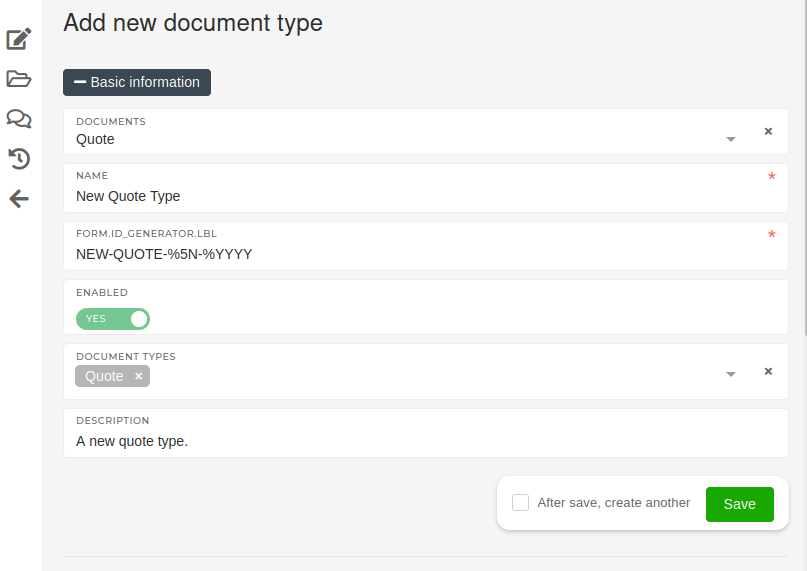 To begin using it, just toggle the **"Enabled"** switch to Yes, ans save the new document type.