This action requires the **"Update attendance events"** permission.
When updating an attendance event, keep in mind, that this information is depended upon by the HR module to work properly, in regards to salary generation and attendance management. 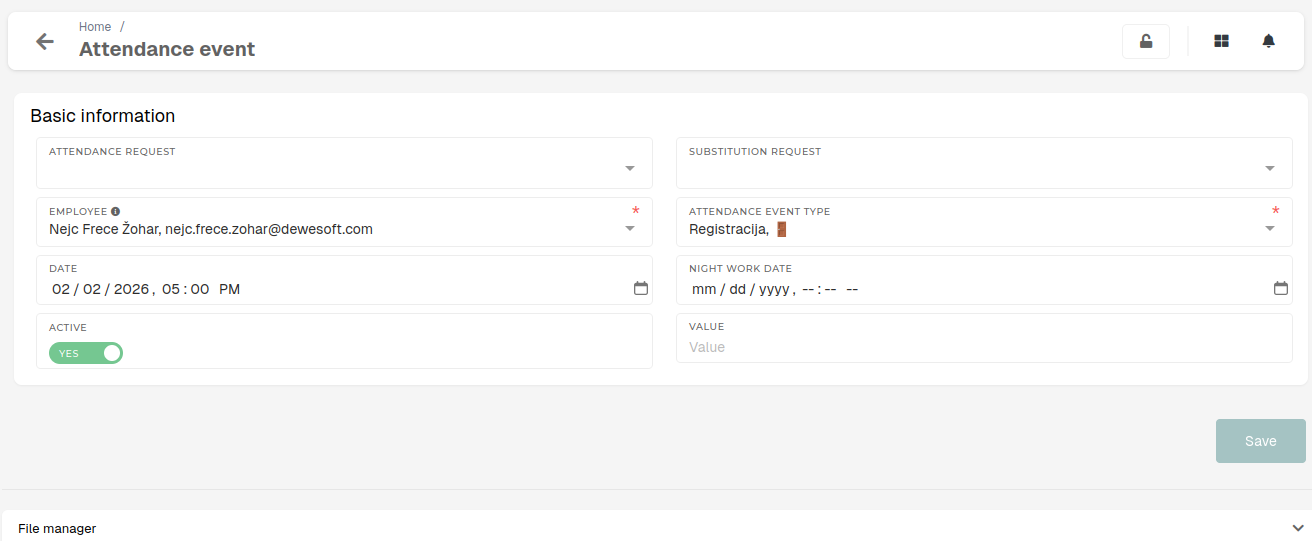 #### Basic information Basic details of the attendance event, such as type, connected - **Attendance request** - The request, to which this event belongs. - This is optional, an event does not inherently require an attendance request. - Lists all attendance requests. - **Substitution request** - The attendance request that substitutes this event's attendance request. - Lists all attendance requests. - **Employee** - The employee, to who the attendance event belongs to. - Lists users with existing HR profile. - **Attendance event type** - The type of attendance event. - If a connected attendance request exists, the event should have the same type as request. - The event type defines an event's behaviour. - **Date** - The date, when the event will have taken place. - If an attendance request exists, this date should be within the from-to range of the attendance request. - **Night work date** - If the event is, for example, a leaving registration of an employee, who worked through the night, this date should be of the previous day, to signify that this date belongs to a night shift's end from the previous day. - **Active** - Denotes, if the event is active (i.e. if the event should be included in processes, regarding attendance records management). - **Value** - The amount of hours, that the event lasted for. - If left blank, amount of a full 8 hours is assumed.