The **employee vacation page** provides a **detailed yearly vacation report** (allocated vacation days, used vacation, transferred, special...)
The [vacation details page](https://placeholder.erp/employee-vacation-details "Link to the vacation details page in ERP") is accessible from the [user profile](https://placeholder.erp/user-profile) page, by clicking the **"Show details"** link under vacation leave graph. [](https://how-to-erp.dewesoft.com/uploads/images/gallery/2026-08/6Acimage.png) The details page shows a report of vacation use of selected user for the selected year. By default, the current year is selected.  The page displays an overview of available/used vacation balances (annual, transferred and special vacations).  Under the overviews, a graph is shown, with selected year's vacation balances (all allocated days, used days and remaining days). [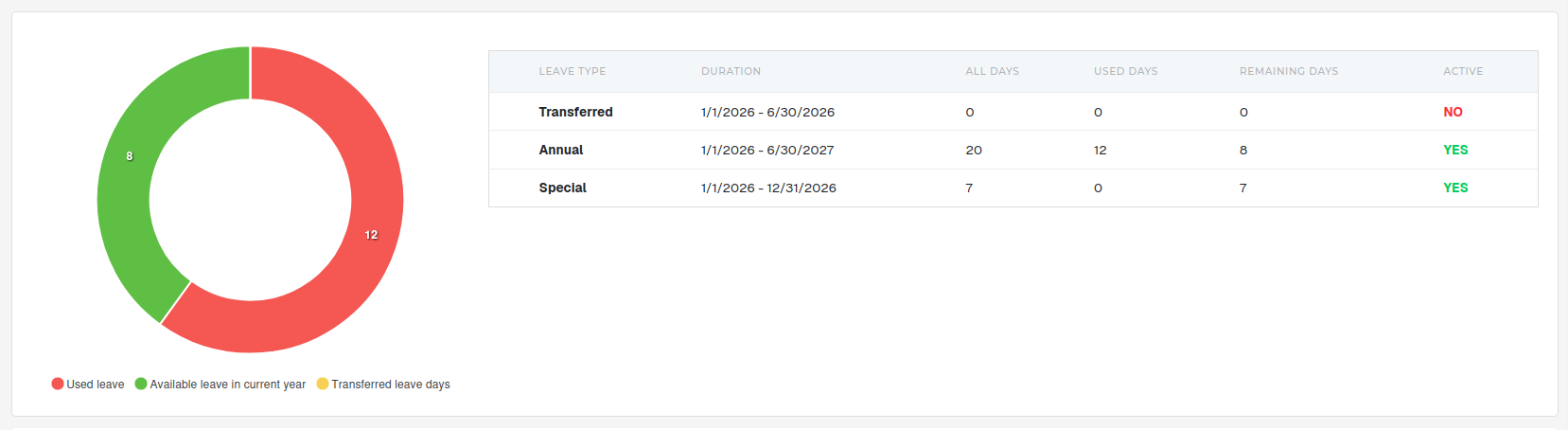](https://how-to-erp.dewesoft.com/uploads/images/gallery/2026-08/2x3image.png) Next to the graph is a table, which lists user's vacation leaves, their usage duration, available, used and remaining days counts and the vacation leave **"active"** state.**Active state** sets, **if** the **vacation** leave **can still be used** or not. **Clicking on the YES/NO labels will display** an **explanation** of why the vacation leave is in/active.
Under the graph is a toggleable section, that shows the selected user's vacation use by month for the selected year.. [](https://how-to-erp.dewesoft.com/uploads/images/gallery/2026-08/t5Himage.png)