# Employee documents

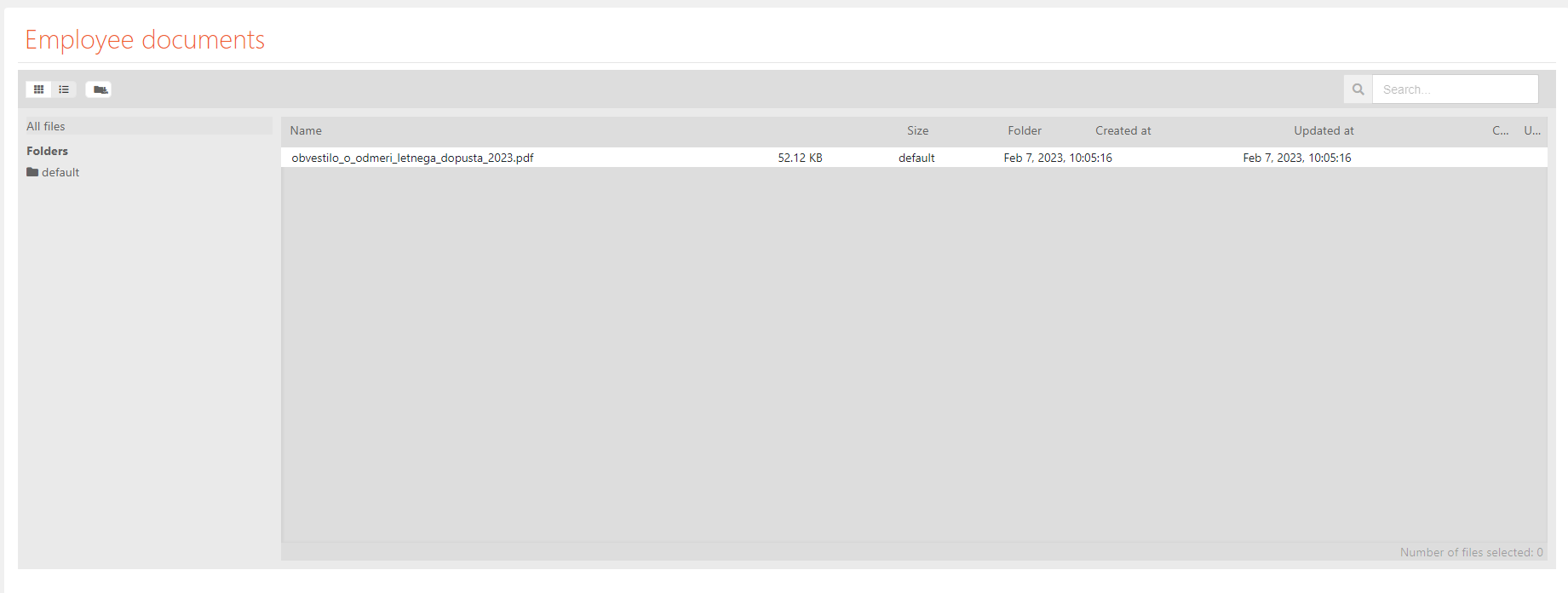
This section contains a file manager view, that contains documents, that pertaining, the logged-in user, that you may see.

Here you can manage (move, upload, download and delete) all of these documents.
![image.png](https://how-to-erp.dewesoft.com/uploads/images/gallery/2023-06/scaled-1680-/A3aimage.png)

The file manager shows, on the left, a tree of your directory, where you can also create new folders, while the right side shows a table view of all files (documents) in a selected folder.

The table <span style="font-family: -apple-system, BlinkMacSystemFont, 'Segoe UI', Oxygen, Ubuntu, Roboto, Cantarell, 'Fira Sans', 'Droid Sans', 'Helvetica Neue', sans-serif; font-size: 14px; font-style: normal; font-variant-ligatures: normal; font-variant-caps: normal; font-weight: 400;">shows</span> the following<span style="font-family: -apple-system, BlinkMacSystemFont, 'Segoe UI', Oxygen, Ubuntu, Roboto, Cantarell, 'Fira Sans', 'Droid Sans', 'Helvetica Neue', sans-serif; font-size: 14px; font-style: normal; font-variant-ligatures: normal; font-variant-caps: normal; font-weight: 400;"> </span><span style="font-family: -apple-system, BlinkMacSystemFont, 'Segoe UI', Oxygen, Ubuntu, Roboto, Cantarell, 'Fira Sans', 'Droid Sans', 'Helvetica Neue', sans-serif; font-size: 14px; font-style: normal; font-variant-ligatures: normal; font-variant-caps: normal; font-weight: 400;">file</span> properties: name, size, folder (location), when it was created and when it was updated.