# ERP Profile settings

Next to your profile photo, you can find some settings, that alter aspects of the ERP.

![image.png](https://how-to-erp.dewesoft.com/uploads/images/gallery/2025-04/scaled-1680-/XPfimage.png)

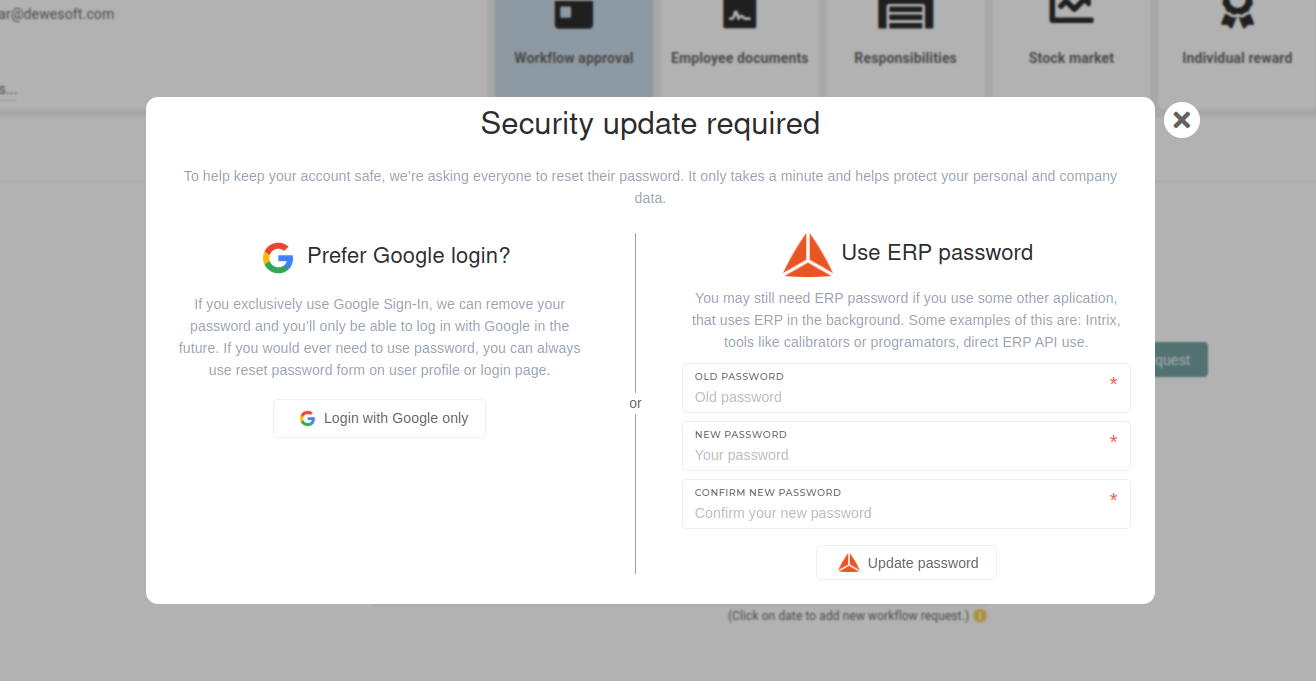
#### Set password

This settings allows you to setup a update your password, or use "Login with Google only", which will allow you only login with google, "disabling" normal email &amp; password authentication.

<p class="callout info">This form allows you to update your password or change to google-only login. It can be altered at any time.</p>

[![image.png](https://how-to-erp.dewesoft.com/uploads/images/gallery/2025-04/scaled-1680-/7GOimage.png)](https://how-to-erp.dewesoft.com/uploads/images/gallery/2025-04/7GOimage.png)

<p class="callout warning">Keep in mind that while google login is simpler, email &amp; password authentication is required for external applications, connected to the ERP.</p>


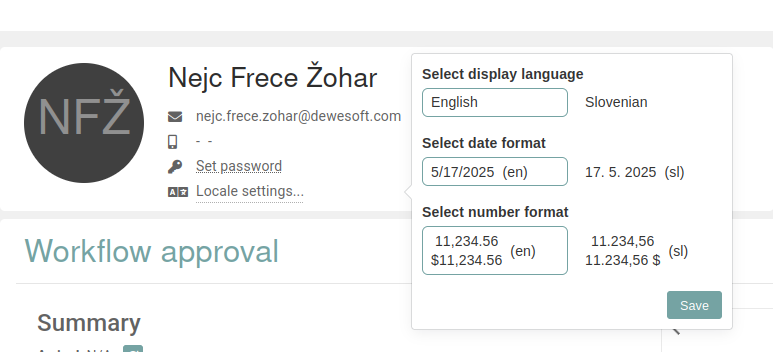
#### Locale settings

In these settings, you can change the language of the ERP. You can also select different date and number formats, depending on which you prefer.

<p class="callout info">The **settings** are **saved on your computer only**. If you log in on a different computer, the settings will need to be set again.</p>

![image.png](https://how-to-erp.dewesoft.com/uploads/images/gallery/2025-04/scaled-1680-/2Xsimage.png)