
Update existing attendance event
This action requires the "Update attendance events" permission.
When updating an attendance event, keep in mind, that this information is depended upon by the HR module to work properly, in regards to salary generation and attendance management.
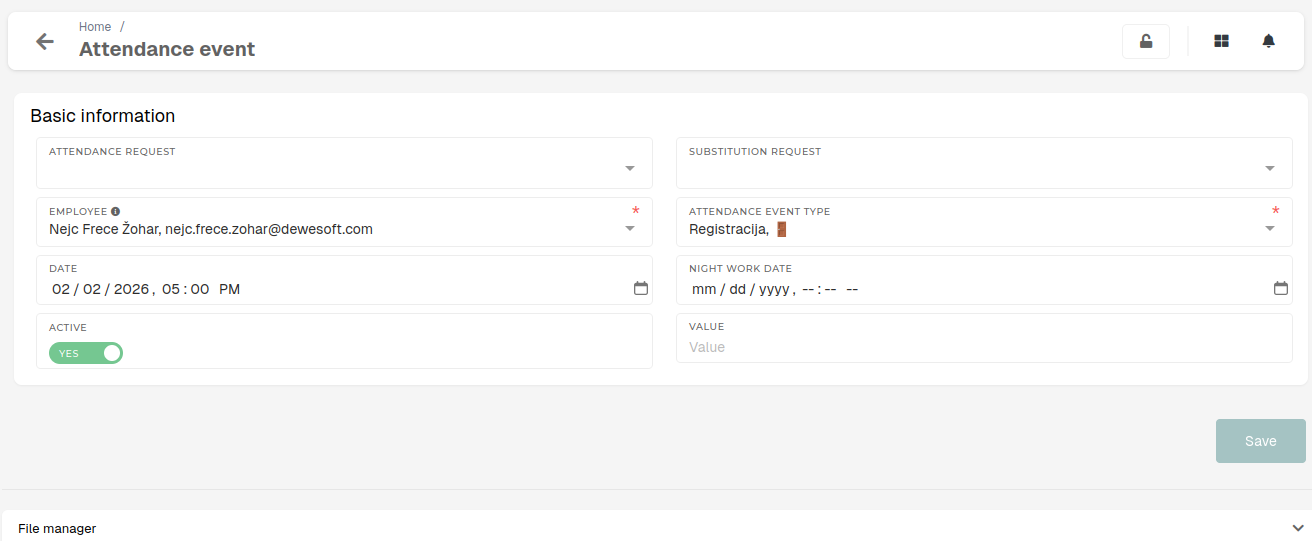
Basic information
Basic details of the attendance event, such as type, connected
- Attendance request
- The request, to which this event belongs.
- Substitution request
- The attendance request that substitutes this event's attendance request.
- Employee
- The employee, to who the attendance event belongs to.
- Attendance event type
- The type of attendance event.
- Date
- The date, when the event will have taken place.
- Night work date
- If the event is, for example, a leaving registration of an employee, who worked through the night, this date should be of the previous day, to signify that this date belongs to a night shift's end from the previous day.
- Active
Denotes, if the event is active (i.e. if the event should be included in processes, regarding attendance records management).
- Value
- The amount of hours, that the event lasted for.