
Employees
The employees tab displays employee statistics (number of active employees, average age....) and several custom exports, relevant for management of human resources.
Statistics
Statistics can be displayed for a specific date. By default, statistics for the current date is shown.
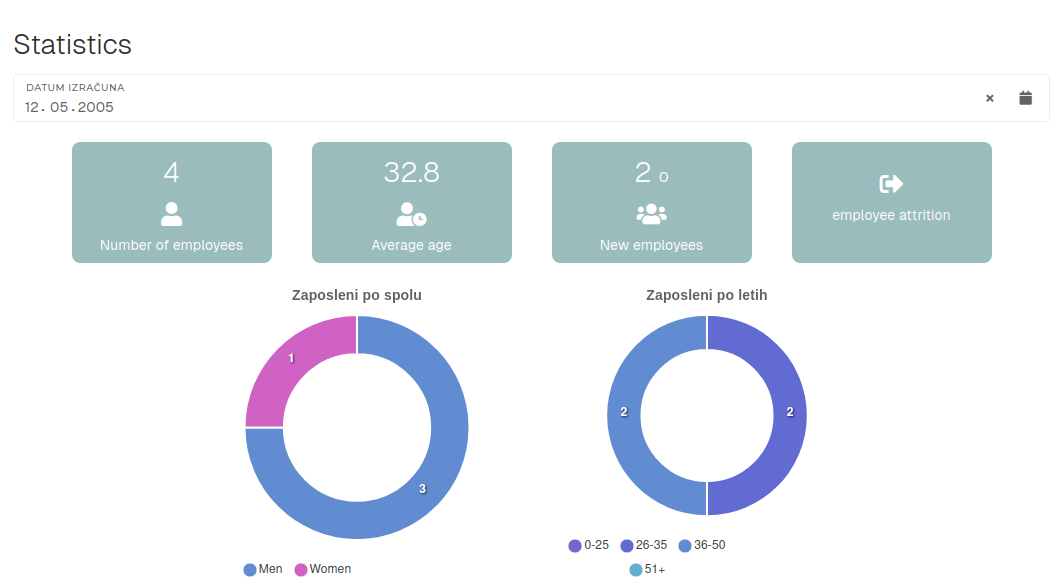
- Number of employees
- Count of employees on selected date.
- Average age
- Average age of employees on selected date.
- New employees
- Count of new employees on selected date.
- A new employee, in this instance, is someone, who started their employment in selected month.
- Employee attrition
- Count of employees, who left the company (departures like retirements, resignations or layoffs).
Exporting
Several custom exports are available. These exports are used by HR for data verification.

The exports may take more time to generate. If the export generation takes too long, it will be generated in the background and sent to your email.