Update existing work location
This action requires the "Update work locations" permission.

Work location
The name of the work location.
The name should be unique, to differentiate between different work locations.
Hidden
If this switch is enabled, the work location is hidden.
Hidden work locations cannot be selected during submission of "Work on location" attendance requests.
Paid lunch
If this switch is enabled, the work location will be marked as "Location with paid lunch".
If enabled, employees that work on that location, automatically receive paid lunch for every workday.
The contact information section contains one or more addresses, linked to that work location.
There should, in the context of work locations, only be one address, as work locations are usually linked to a specific location.
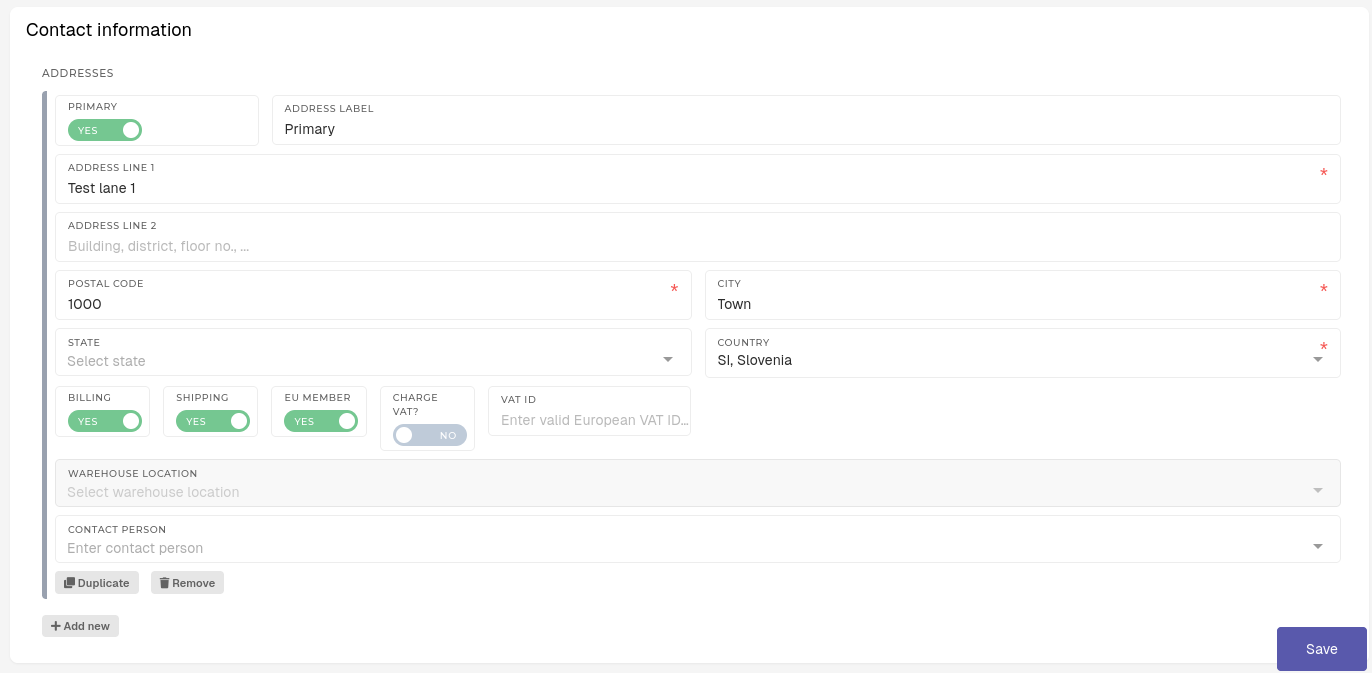
For the work location addresses, the following fields are important:
Primary
This switch sets the address as a primary address for the work location.
Only one address can be set as primary at any given time.
Address label
A custom label for the address.
Useful for finding a specific address, where multiple addresses exist.
Address Line 1
The first line of the address.
Address Line 2
The second line of the address.
Is optional, if needed.
Postal code
The postal code of address's city.
City
The city, where the address is located.
State
The state of the address's country.
Is optional, if needed.
Country
The country of the address.
