
Update existing HR department
This action requires the "Update hr departments" permission.
When updating a HR department, keep in mind, that some of the information is depended upon by the HR module to work properly.
Among these, the "department lead" and "lunch time" are some of the more sensitive details, as these are used for employee attendance request approvals and auto-generation of lunch events, respectively.
Basic information
This section contains basic details about the HR department.
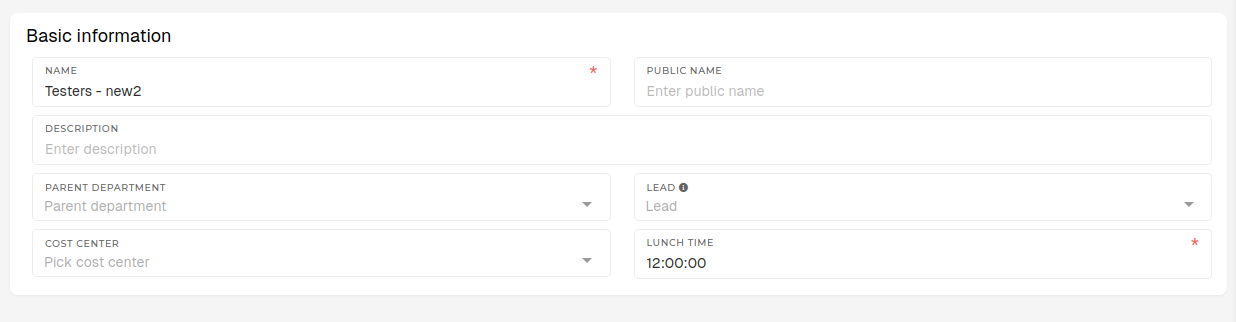
- Name
- The name of the HR department.
- Department name should generally be a unique one, in order to avoid confusion while searching through departments.
- Public name
- The public name of the HR department.
- If your HR department name is in your native language, this should be its english equivalents.
- Description
- A short description of the HR department.
- Not required, but any additional information about the department should go here.
- Parent department
- Select a higher-level HR department, inside which the current HR department is.
- E.g. Production department is the parent department of an Assembly department.
- List contains all HR departments.
- Lead
- The lead/head of the department.
- Only users with the "Employee" role and an existing HR profile are listed here.
- The employee, who is selected here, will be the default approver for attendance requests of all employees within the department.
- Cost center
- The cost center, which applies to the department as a whole.
- Lunch time
- The time, when employees of the department should have lunch.
- The value here must be formatted as HH:MM:SS (12:00:00) or HH:MM (12:00)
- The time, set here, is used when auto-generating "Lunch" attendance events for of the department.
Approver substitutes
This section contains details about temporary attendance approval substitutions, for cases when the primary approver (lead of the department) is unable to approve employee's attendance for month (e.g. sick leave, vacations...)
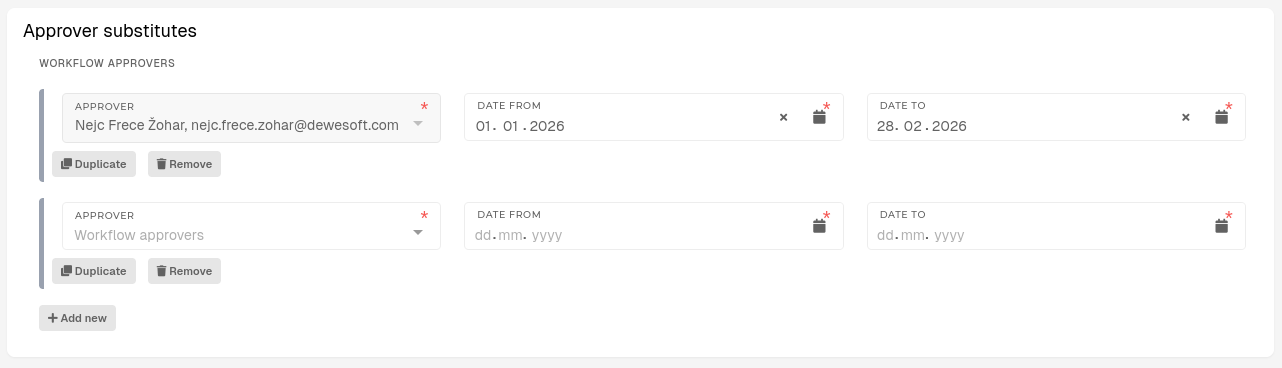
- Approver
- The employee, who will substitute for department's lead as attendance request approver.
- This list contains only users with HR profiles.
- Date from
- The start date of the substitution period.
- Date to
- The end date of the substitution period.
- Once this date is in the past, approver is locked and cannot be changed.
Work positions
This section lists all work positions, currently in the department.
