
Update existing job applications
This action requires the "Update job application" permission.
All information within a job application can be altered.
Any changes will be reflected on the "PDF Job application" print, that can be generated from a job application.
Basic information
Basic details of the job application, its type, the applied for work position and how they found us.
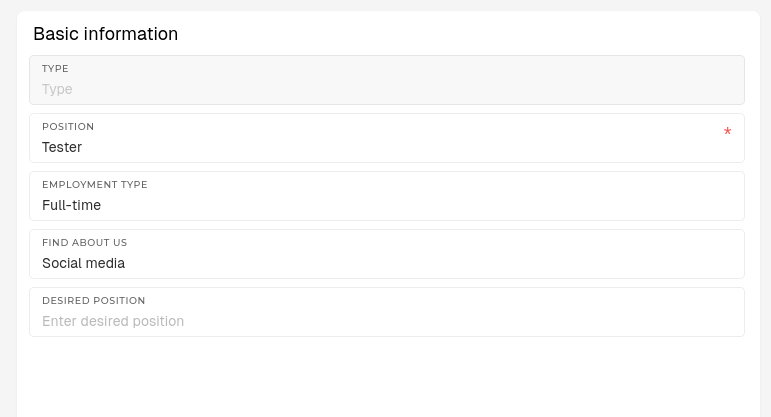
- Type
- Type of job application
- E.g. applying for job, internship...
- Position
- The position, for which the applicant submitted their application
- Employment type
- The employment type of the application
- Options: Full-time, Student, Part-time...
- Find about us
- How the applicant found our company.
- E.g. through friends, school, social media...
- Desired position
- The desired position, an alternative to the main position
User information
A list of basic details about the applicant.
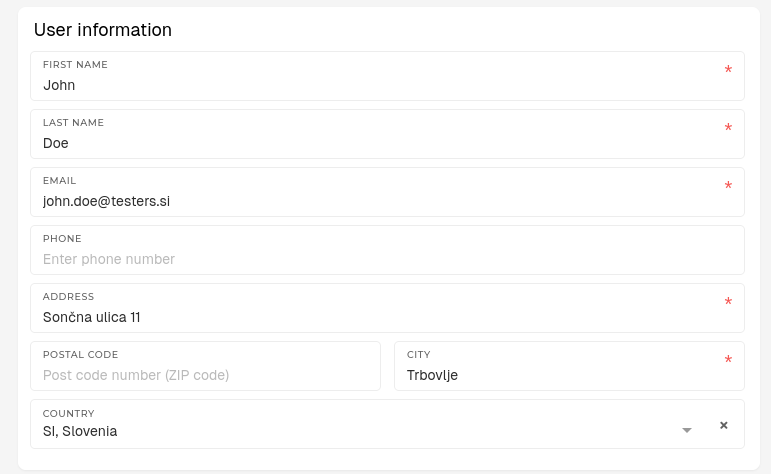
- First name
- Applicant's name.
- Last name
- Applicant's surname.
- Applicant's surname.
- Email
- Applicant's email address.
- When a new job application is created, a response can be sent to this email.
- Phone
- Applicant's contact phone.
- Address
- Applicant's address.
- Postal code
- Postal code of the applicant's address.
- City
- City of the applicant's address.
- Country
- Country of the applicant's address.
Activity information
Information about the state of a job application.
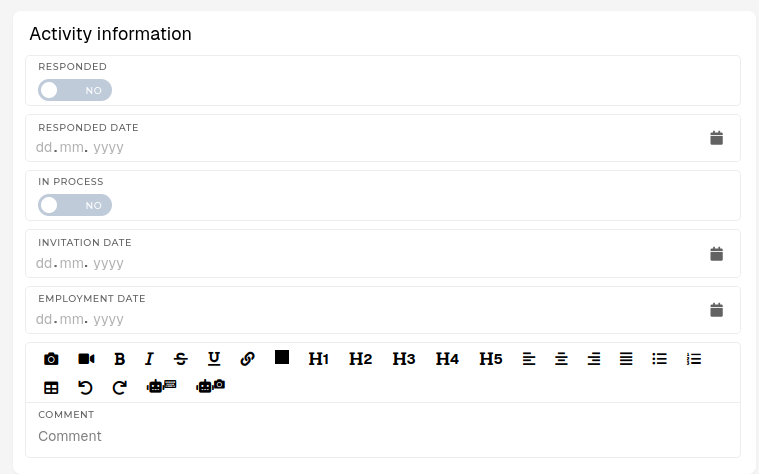
- Responded
- Tick this, if a response has been sent to the applicant.
- Response here should be interpreted as application rejection or invitation for an interview.
- Responded date
- The date, when the response has been sent to the applicant's email.
- In process
- Tick this, if the applicant has been invited for an interview.
- Invitation date
- The date of the scheduled job interview.
- Comment
- A comment about the applicant.
- Reason for rejection or additional details.
Message information
The message that the applicant can add.
