
Update existing rewards/bonuses
This action required the "Update rewards and bonuses" permission.
When editing an existing reward/bonus, keep in mind that alterations could require additional explanations.
Only rewards/bonuses, that have selected month in the future, can be edited. Rewards with payout dates, that have already passed, are considered "paid out", and should not be altered.
On "paid out" rewards, the edit button is replaced by a clock icon. This denotes that the rewards/bonus is not to be altered.
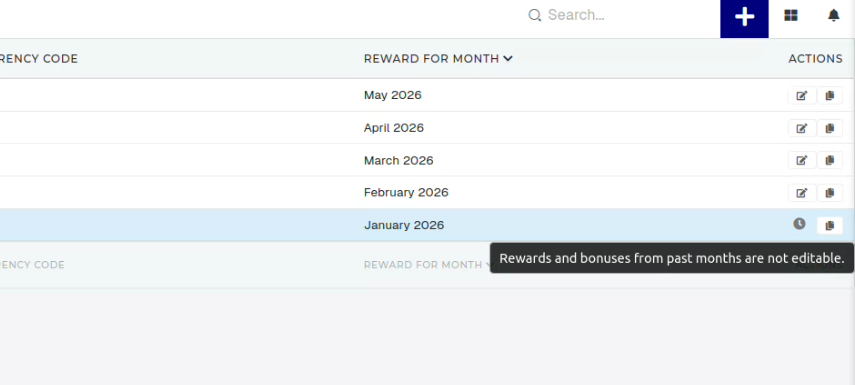
To edit a future rewards/bonus, click the edit button, this will redirect you to the editing form.
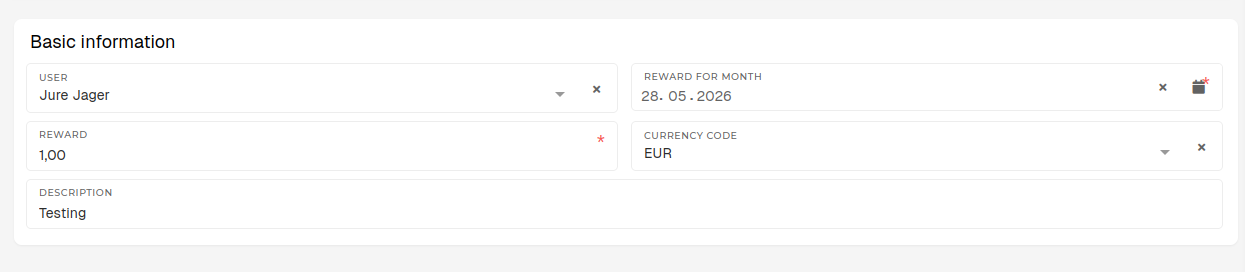
- User
- Select the user, who will receive the reward/bonus.
- Lists all users, who are eligible for a reward/bonus.
- Reward for month
- Select the month, when the rewards should be "paid out"
- Reward
- The amount of the reward to be paid out to employee in the selected currency.
- Currency code
- The currency, in which the reward will be paid out.
- The currency, in which the reward will be paid out.
- Description
- A description, containing details about the reward/bonus.
- Is not required, but should still be added.
- Should contain a clarification/reason for the reward/bonus.